Don’t Type Your Bank Password in WeChat: Understanding the Three Layers of Command Line Environments
In today’s explosion of AI tools, installing OpenClaw or various open-source projects has become routine for many. Yet for most users without a technical background, that black “terminal” feels like an endless void. The most common errors stem from one fundamental confusion: who are you actually talking to?
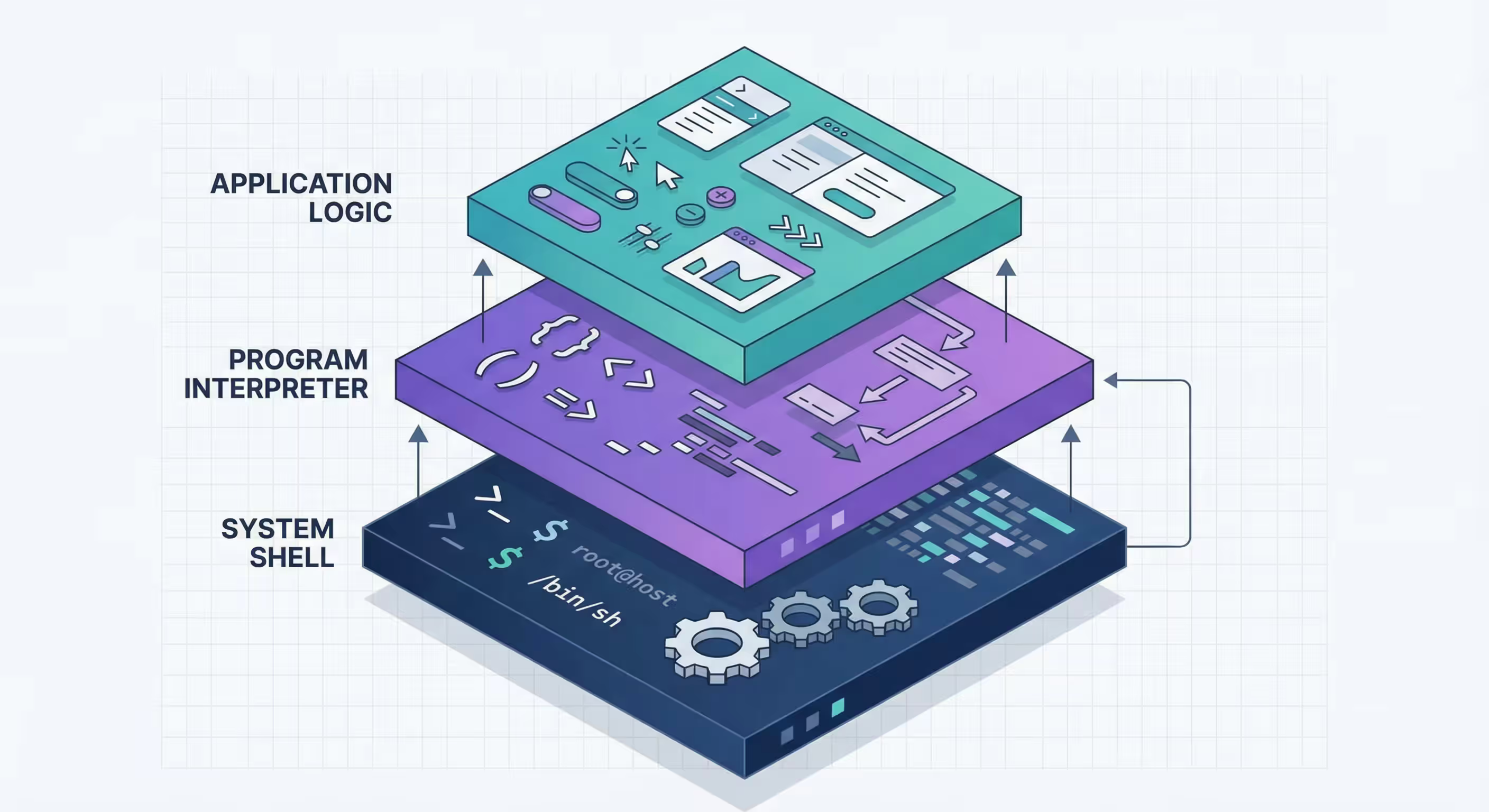
To master the command line, you must understand its core three-layer architecture.
Layer 1: System Shell — “The Entire Building”
When you open macOS Terminal or Windows PowerShell, you enter an operating system-level interface.
- Role: You are the owner of the building, issuing management commands to the OS.
- Functions: Moving folders (
cd), listing files (ls/dir), installing foundational software (brew/apt). - Typical prompt: Usually ends with
$or%. - Technical essence: This is the command interpreter (like Zsh, Bash), responsible for translating your input for the kernel.
Layer 2: Program Interpreter — “The Specific Room”
When you type python, node, or enter any program’s interactive mode, you move from the “building hallway” into a “specific laboratory.”
- Role: You are now conversing with a specific programming language or runtime environment.
- Functions: Execute syntax unique to that language (e.g.,
print("Hello")in Python). - Fatal mistake: Many users try typing
cd Desktopwhile in Python mode (prompt usually>>>). It’s like searching for kitchen utensils in a chemistry lab—wrong environment, failed command.
Layer 3: Application Logic — “The Teller Service”
This is the innermost layer, typically encountered when running a specific Bot (like OpenClaw) or installation scripts.
- Role: The program is already running and in a “blocked” state, waiting for specific business information from you.
- Functions: Entering API keys, setting admin passwords, confirming installation options (y/n).
- Fatal mistake: Any Linux command or code entered here is invalid. The program only recognizes its preset “passwords” at this stage.
Why Understanding “Layers” Matters
1. Precise Error Localization
When you see command not found, 90% of the time you’re standing on the wrong layer. For example, typing Python functions in the system Shell, or entering system path commands in a Python environment.
2. Sensitivity to Initialization Order
As you can see, the terminal reads configuration files (like .zshrc) line by line at startup, like “decorating a room.” If you try to use tools (execute completion commands) before opening the toolbox (loading completion plugins), the system crashes. This is the significance of environment initialization order.
3. From “Blind Typing” to “Awareness”
The difference between beginners and experts is that experts carry a clear mental map of the environment. They know that behind every blinking cursor lies either an OS kernel, a language VM, or application business logic waiting.
Summary
Distinguishing environment layers is the first step toward becoming a “digital citizen.” Don’t do the right thing at the wrong layer—that’s the source of all technical frustration.
Published at: Feb 6, 2026 · Modified at: Feb 6, 2026